Mobile Game GUI Pack 03: A Complete UI Kit for Indie Developers
For anyone who has spent months coding the mechanics of a 2D mobile game, the realization that you now need to design the entire user interface can feel like hitting a wall just before the finish line. You have the gameplay loop, the logic, and the assets, but the menus, health bars, and buttons are what bridge the gap between a functional prototype and a polished product. This is where having a robust design asset library becomes not just a convenience, but a necessity. If you are looking to bypass the tedious process of drawing every single pixel from scratch without sacrificing a cohesive visual style, the Mobile Game GUI Pack 03 offers a comprehensive solution that balances flexibility with professional aesthetics.
Beyond Just Buttons: The Anatomy of a Professional Interface
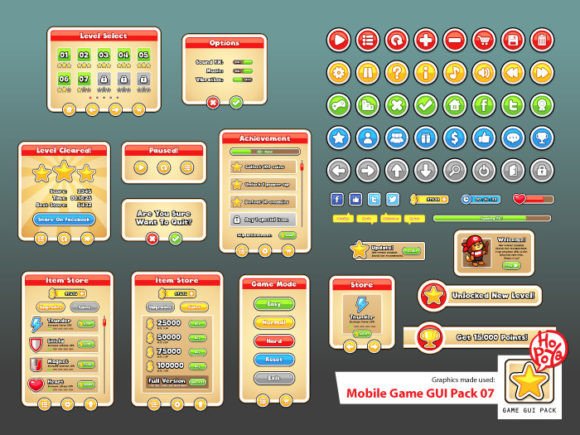
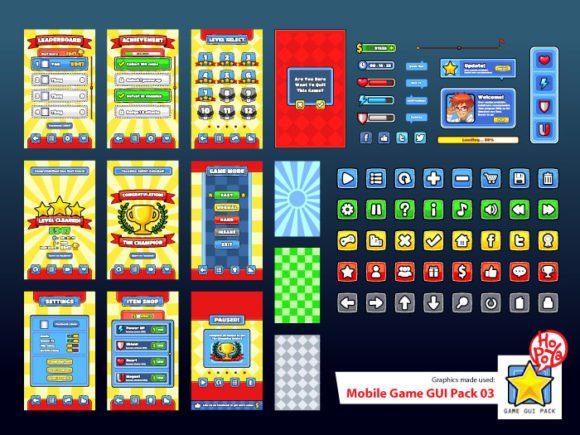
When we talk about a "GUI Pack," we are discussing much more than just a collection of clickable squares. A truly effective graphical user interface kit acts as the foundation of your game's visual identity. This specific pack includes over 40 customizable buttons, but the real value lies in the versatility of those elements. With five distinct color variations included, you aren't locked into a single mood. Whether your game is a high-energy arcade shooter requiring vibrant neons or a strategy game demanding muted, serious tones, the color palette can be adapted to fit the narrative.
The inclusion of customizable windows and game elements is particularly useful for maintaining visual consistency. In game design, consistency breeds professionalism. If your "Start" button looks different from your "Settings" button, or if the pop-up window for "Game Over" clashes with the "Inventory" screen, it breaks the player's immersion. This pack provides the building blocks to ensure that every interaction the player has with the software feels unified. It allows small business owners and indie developers to achieve the level of polish usually reserved for studios with dedicated UI/UX departments.
Vector Precision and File Flexibility
One of the most significant hurdles in working with pre-made design assets is the "flat file" problem—downloading a JPG or a flattened PNG only to realize you can't resize it for a high-resolution tablet or change a specific color without re-drawing it. This is why the technical specifications of the Mobile Game GUI Pack 03 are worth noting. The pack includes Vector AI (CS) and EPS10 files. For designers, this is a game-changer. It means the assets are infinitely scalable. You can resize a button for a small smartphone screen or a massive desktop port without any loss of quality or pixelation.
Furthermore, the availability of transparent PNG files ensures that even if you don't have access to advanced vector editing software like Adobe Illustrator, you can still drag and drop these elements into game engines like Unity, Godot, or GameMaker. The workflow is designed to be frictionless. You don't need to spend hours cutting out backgrounds or masking layers; the assets are ready to go, allowing you to focus on the brand identity of your game rather than the technical grunt work of asset preparation.
Typography That Pops: Titan One and Boris Black Bloxx
A GUI is only as good as the text that accompanies it. Bad typography can ruin a great button design. This pack comes pre-configured with two specific typefaces that are excellent choices for the gaming medium: Titan One and Boris Black Bloxx.
Titan One is a display font that commands attention. It’s bold, friendly, and slightly retro, making it perfect for headers, titles, and main menu logos. It carries a weight that ensures readability even on smaller screens, which is a crucial consideration for mobile design. On the other hand, Boris Black Bloxx offers a heavy, architectural feel. It is a typeface that feels solid and impactful, ideal for scores, energy displays, or warning messages where you need the user to see the information instantly.
By including these specific fonts, the pack solves a common font pairing dilemma. You have a primary display font and a secondary supporting font that naturally complement each other. This helps in brand recognition; players will associate that specific typographic style with your game's world. For content creators or marketers looking to create social media graphics or marketing assets to promote the game, having these distinct, recognizable fonts ensures that your promotional materials match the in-game experience perfectly.
Practical Applications: From In-Game to Marketing
While the primary use case is the user interface within the game engine, the utility of a high-quality GUI pack extends much further. Think about the ecosystem surrounding a game launch. You need a cohesive look across all platforms.
Consider using these assets for packaging design if you are selling physical merchandise or a "deluxe edition" box. The customizable windows can be repurposed for invitations to a beta testing group or a launch party. The buttons and icons can be integrated into editorial layouts for a press kit or a developer blog. If you are selling digital products or templates to other developers, these assets can help you create a professional storefront.
Even outside of the gaming sphere, the aesthetic of the Mobile Game GUI Pack 03 has applications in web design. The "gamification" of websites—using progress bars, achievement badges, and interactive buttons—is a growing trend in UX to increase audience engagement. A fitness app, a language learning platform, or a rewards-based e-commerce site could utilize these vector elements to create an engaging, interactive experience for their users.
Choosing the Right Style for Your Project
When selecting a GUI pack, it is vital to assess the "personality" of the asset against the personality of your project. The style in this particular pack leans towards a clean, 2D aesthetic that works well for platformers, puzzle games, and casual mobile titles. It avoids the hyper-realistic look that can often feel dated quickly, opting instead for a modern typography and design approach that ages well.
Before integrating any design assets, take the time to test the readability of the buttons in context. Place the buttons against your game's background colors to ensure contrast. Does the text stand out? Is the "hit box" (the clickable area) large enough for a thumb? The customizable nature of this pack allows you to tweak these elements to pass these usability tests.
It is also important to review the commercial licensing considerations. If you are a freelancer creating a game for a client, or a small business owner selling a final product, you must ensure your license covers commercial use. This ensures that your brand identity is legally protected and that you can monetize your work without legal hurdles.
Ultimately, a tool like the Mobile Game GUI Pack 03 is about efficiency and quality. It allows you to allocate your most valuable resource—time—to the creative aspects of your project that truly require your unique touch, while relying on professional, vector-ready assets for the structural elements that hold the game together. Whether you are building a complex RPG or a simple hyper-casual game, having a versatile, customizable, and professionally designed UI kit is the first step toward a successful launch.